Custom Fabric Printing Resources
Planning a custom fabric project starts with choosing the right base textile, preparing your artwork at the correct size and resolution, and understanding how color can translate from screen to fabric. The resources below will help you make those decisions before your artwork goes into production.
The Textile District prints custom fabric by the yard in the USA on 15+ quality base textiles for apparel, quilting, home décor, upholstery, accessories, small-batch production and other sewn products. New print files are personally reviewed before production, and volume pricing is available for qualifying larger orders.
- Compare base fabrics, specifications & pricing
- Order the Ground Fabric Swatch Kit
- Explore the Custom Print Color Library
- Review file setup & repeat options
- Start a custom fabric order
Start with the Fabric
The same artwork can look and feel different depending on the fabric underneath it. Weight, weave, texture, drape, fiber content and printable width all affect the finished result.
Ground Fabric Swatch Kit
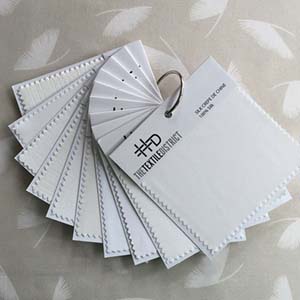
Our Ground Fabric Swatch Kit includes a 5" x 5" unprinted sample of every base fabric we carry. Use it to compare hand, weight, texture, drape, weave and overall suitability before ordering printed yardage.
For detailed fiber content, fabric weight, printable width, recommended uses, care information and current printed pricing, visit Our Fabrics.
Order the Ground Fabric Swatch Kit
Plan Color with Printed References
Custom Print Color Library
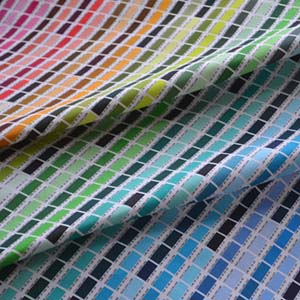
Color on fabric will not look exactly like color on a backlit screen. Fiber content, weave, surface texture, surrounding colors and lighting can all affect how a printed color is perceived.
The Custom Print Color Library provides a printed reference for exploring saturation, undertones and color relationships on fabric. It is especially useful when developing coordinated palettes or when color is an important part of a custom project.
Shop the Custom Print Color Library
You can also view both sampling tools together in Design Tools.
When to Consider a Production-Quality Proof
If color, scale, repeat, placement or the finished appearance is especially important to your project, consider printing a one-yard production-quality proof on the actual base textile before ordering larger yardage.
The proof is produced using the same printing and finishing process as larger orders. It is finished, usable fabric rather than a disposable test swatch.
The Ground Fabric Swatch Kit helps you choose the substrate. The Custom Print Color Library helps with color planning. A production-quality proof lets you evaluate your own artwork on the actual fabric you intend to use.
If you want to change the artwork after reviewing the proof, correct your file and submit the revised file with a new order before moving into larger production.
Prepare Your Artwork for Printing
Custom print files should be supplied print-ready and at the exact scale you want them printed. Before submitting artwork, confirm the following:
- Resolution: 300 DPI at final print size
- Color mode: RGB or Lab
- File format: TIFF or JPG
- Scale: Artwork should already be sized as you want it printed
- Repeats: Seamless repeat files should tile cleanly horizontally and vertically
- Panels: Engineered or placement prints must fit within the printable width of the selected base fabric
- Background color: Our base fabrics are white, so any colored background must be included in the artwork
We do not resize, recolor or otherwise alter your artwork. If scale, repeat, placement, color or another part of the file needs to change, correct the artwork before submitting it for production.
Personal File Review Before Production
New custom print files are reviewed by a member of The Textile District team before production.
We look for common file and setup issues that may affect the printed result. If we see something that needs attention, we contact you before the file moves forward.
File review does not include resizing, recoloring or editing your artwork. Any necessary artwork changes remain with the customer.
Repeat Types at a Glance
The repeat style affects how a design moves across the fabric. Choose the layout that best suits the artwork and the finished project.
- Standard repeat: The design repeats directly across and down in an even grid.
- Half-drop repeat: Each vertical row is offset by half the repeat height for a more staggered flow.
- Half-brick repeat: Each horizontal row is offset by half the repeat width.
- Mirrored repeat: Artwork alternates by reflection to create a symmetrical repeat.
- Panel or placement print: Artwork is positioned as a defined panel rather than repeated continuously.
Before submitting a repeat file, check every edge carefully to confirm that it tiles cleanly. For panels and placement prints, confirm the finished dimensions against the printable width of your chosen fabric.
See illustrated repeat examples and file-preparation guidance
How Our Fabrics Are Printed
Cotton, linen and cotton-linen blends are direct printed with OEKO-TEX® certified fiber-reactive dyes. After printing, the fabric is steamed, washed and dried as part of the finishing process, leaving it soft, colorfast and ready to sew.
Poly Spandex 4-Way Knit, Polyester Linen and Polyester Fleece are sublimation printed using a process suited to polyester fibers. Polyester Outdoor uses a specialized printing process and formulation designed for water-repellent performance and 500+ hours of UV lightfastness.
Printed fabric arrives finished and ready to sew, so no pre-washing is required.
Because fiber, weave, surface texture and printing process can influence the finished appearance, use our fabric and color resources when those details are especially important to your project.
Name Your Files Clearly
A consistent file name helps us match your artwork to the correct design, colorway and order.
Recommended format:
Brand Name_Design Name_Color Name.tif
Use the same file name in the Special Instructions field when placing your order. If you are submitting multiple designs or colorways, give each file a distinct name that clearly identifies the artwork.
Ordering Custom Printed Fabric
When your artwork and fabric choice are ready:
- Choose the base fabric on the Print Custom Fabric page.
- Enter the yardage you want to print.
- Select the repeat type.
- Enter the print file name in the Special Instructions field and indicate whether it is a new file or a reprint.
- Complete checkout.
- Send your print-ready artwork separately through Dropbox or WeTransfer to info@thetextiledistrict.com.
New files are reviewed before production. Approved print files are retained for easier reordering, so unchanged files generally do not need to be resubmitted for future reprints.
Artwork Rights & Permissions
Please submit only artwork that you created or have permission to reproduce and print. By submitting a file for custom printing, you are responsible for confirming that you have the necessary rights to use the artwork.
Special Orders & Production Projects
Need help with a larger production run, a special substrate, multiple designs, engineered panels or a project that falls outside a standard online order? Contact us with the project type, expected yardage, fabric requirements and any special finishing or put-up needs.
Orders of 3 yards or more are shipped rolled on a core to help minimize folds and creases. For qualifying production quantities, additional put-up and special-order options may be available.
If several designs or colorways can use the same base textile, consolidating them on one substrate may also help you qualify for volume pricing. Visit Fabric Pricing & Volume Discounts for details.
Need Help Before You Order?
If you are unsure about fabric selection, printable width, artwork scale, repeat setup or color, it is better to resolve those questions before the file goes to production.